Performance
Four things decide whether your game runs well on a phone: how much memory your textures take, whether you create objects during gameplay, whether your scripts allocate every frame, and whether you can see any of it happening.
This page covers all four. If you only read one section, read Object pooling — it is the one that turns a stuttering action game into a smooth one.
Texture compression
Textures dominate memory in a 2D game. Six 2048×2048 sprite atlases cost about 100 MB of video memory uncompressed. Compressed, the same artwork costs about 25 MB.
You do not have to do anything to get this. Every texture is compressed when you export a build, using a format the target device can sample directly. The editor always loads your original file, so nothing you see in the viewport changes — only what ships.
When to override it
Select a texture in the Content Browser and look at Import Settings → Compression in the Properties panel.
| Setting | What it does | Use it for |
|---|---|---|
| Auto | Balanced. About 9× smaller than uncompressed on mobile. | Everything, unless one of the rows below applies. |
| None | Ships your original file untouched. | Pixel art, logos, hard-edged UI, anything with text baked into it. |
| Quality | 4× smaller — the least lossy compressed option. Slower to encode. | Art that visibly smears on Auto but doesn't need to ship raw. |
| Size | About 16× smaller. | Large, soft artwork: backgrounds, gradients, smoke, clouds. |
Block compression is lossy. It is invisible on most artwork and obvious on some — look at your own art rather than trusting the setting. A logo that comes out fringed wants None; a sky gradient can usually take Size with nothing to see.
Quality and Size are mobile-only
Desktop and older Android use fixed-rate formats with no block-size choice, so all three compressed settings encode identically there. The setting is honoured where it means something and ignored where it doesn't.
Why your first export is slow and the second isn't
Encoding is genuinely expensive — seconds per texture. Results are cached by content, so:
- Re-exporting with nothing changed re-encodes nothing.
- Changing one texture re-encodes that one.
- Switching branches doesn't invalidate the cache (it keys on file contents, not timestamps).
The cache lives in .joystick/TextureCache/ inside your project. Deleting it is always safe; it just costs you one slow export.
Object pooling
Creating an entity costs an entity, its components, a physics body, and a C# object. Doing that twenty times a second for bullets means sustained churn in three allocators at once, and on a phone you feel it.
A pool pays that cost once, up front, and then hands the same entities out forever.
Setting one up
- Put one bullet in your scene, set up exactly how you want spawned bullets to look.
- Name it
Bullet. The pool's name is the template entity's name. - Create the pool from a script.
public class Gun : GameEntity
{
    private Pool m_Bullets;

    protected override void OnCreate()
    {
        m_Bullets = Pools.Create("Bullet", prewarm: 64, growth: PoolGrowth.Double, max: 512);
    }

    private void Fire(Vector3 muzzle)
    {
        GameEntity? bullet = m_Bullets.Get();
        if (bullet == null)
            return;                 // pool is at its cap — see below

        bullet.Translation = muzzle;
    }
}
The engine disables your template for you, and never hands the template itself out — you won't get a stray bullet parked at the origin.
prewarm builds instances immediately, which is the entire point: you pay for 64 bullets during a load screen instead of during a firefight.
Returning them
m_Bullets.Release(bullet);Releasing is safe to call on something that isn't pooled, or that was already released — both happen in real games where two systems each decide a bullet is finished.
The one thing that will bite you
Your state is not reset for you
A pooled entity keeps everything from its previous life: velocity, animation frame, timers, and every field on your script. A recycled bullet that arrives already moving is not a bug in the engine — it is an empty OnDespawn.
Pooled entities are deactivated, not destroyed, so OnCreate and OnDestroy fire once each for the whole life of the instance. The hooks that fire on every reuse are OnSpawn and OnDespawn:
public class Bullet : GameEntity
{
    private float m_Lifetime;

    protected override void OnSpawn()
    {
        m_Lifetime = 3.0f;          // start of life
    }

    protected override void OnDespawn()
    {
        // Clear anything that would carry into the next life.
        Rigidbody2DComponent? body = GetComponent<Rigidbody2DComponent>();
        if (body != null)
            body.LinearVelocity = Vector2.Zero;
    }
}
OnDespawn runs before the entity is disabled, so physics and audio are still live there — zeroing a velocity works.
Growth and the cap
growth | Behaviour |
|---|---|
PoolGrowth.Fixed | Never grows. Get() returns null once everything is in use. |
PoolGrowth.Linear | Adds its prewarm count again each time it runs dry. |
PoolGrowth.Double | Doubles. The right default for bullets. |
Every pool has a hard max. This is deliberate: an unbounded pool under a runaway spawn bug is an out-of-memory kill on a phone, while a capped one is a visible stutter and one log line telling you which pool it was.
A frame hitch can grow your pool
If you spawn at a rate — credit += rate * ts — then one slow frame emits a burst, and nothing can be released yet because none of those objects have reached the end of their lifetime. In-flight briefly spikes and the pool grows.
This is measured, not hypothetical: a 500/second spawner with a 0.1 s lifetime sits at ~52 in flight forever, but doubled its pool once during Play-mode startup. Either prewarm above your worst-case burst, or clamp the spawns you allow in a single frame:
int spawnsThisFrame = 0;
while (m_Credit >= 1.0f && spawnsThisFrame < 16)
{
    m_Credit -= 1.0f;
    spawnsThisFrame++;
    // ... spawn ...
}
Handle Get() returning null — it means you hit the cap. You can see it coming:
if (m_Bullets.AtCap)
Log.Warn($"Bullet pool exhausted: {m_Bullets.InUse}/{m_Bullets.Max}");Free, InUse, Capacity, Max, and AtCap are all readable at any time.
Scenes and pools
Pools are cleared when their scene unloads. To keep one across a scene change, call Persist() on the template entity before creating the pool — the pool then lives wherever its template lives.
Pooled entities freeze with everything else when Time.TimeScale is 0.
Allocation discipline
Every C# object you create feeds the garbage collector. On desktop you may never notice; on a Mono/AOT phone, a collection is a visible hitch. The goal for steady-state gameplay is simple and achievable: zero bytes allocated per frame.
Five rules get you there.
1. Don't build strings in OnUpdate
This is the single most common cause, and it hides in plain sight:
// ✗ allocates a new string every frame — 60 per second, from one label
m_Label.Text = $"{m_Score}";

// ✓ allocates nothing
m_Label.SetInt(m_Score);
SetInt and SetFloat pass the number to the engine and let the engine format it, so nothing is allocated on the C# side at all.
protected override void OnUpdate(float ts)
{
    m_ScoreLabel.SetInt(m_Score);
    m_TimerLabel.SetFloat(m_TimeLeft, digits: 1);
}
2. Reuse buffers instead of taking new collections
Any API that hands you back a fresh array or list allocates one per call. Where the engine offers a version that fills a buffer you supply, use it, and keep the buffer in a field rather than creating it in OnUpdate.
3. Cache your component lookups
GetComponent<T>() is cheap, but calling it several times a frame is still work you can do once in OnCreate.
4. Prefer structs for small values
Vector2, Vector3, Vector4 and Pool are all structs — passing them around allocates nothing. Keep your own small value types the same way.
5. Watch out for closures
A lambda that captures a local variable allocates. In a per-frame path, hoist it or avoid it.
Seeing it happen
Rules you can't measure are rules nobody follows, so the numbers are readable from script in a development build.
protected override void OnUpdate(float ts)
{
    if (Profiler.AllocatedBytesThisFrame > 0)
        Log.Warn($"allocating {Profiler.AllocatedBytesThisFrame} bytes/frame");
}| Property | What it tells you |
|---|---|
Profiler.AllocatedBytesThisFrame | Bytes the managed heap grew during the last frame. Drive this to 0. |
Profiler.GCCount | Collections since startup. How fast it climbs during gameplay is what matters. |
Profiler.AllocationBudgetBytesPerFrame | Set it, and the engine logs a warning naming the worst-offending script. |
// Warn me if any frame allocates more than 4 KB.
Profiler.AllocationBudgetBytesPerFrame = 4096;
The warning names the script class responsible, which is usually enough to find the offending line immediately.
For total memory rather than per-frame churn, Memory reports what the engine itself is holding:
Log.Info($"textures: {Memory.UsedBy(MemoryCategory.Textures) / (1024 * 1024)} MB");
Log.Info($"peak: {Memory.Peak / (1024 * 1024)} MB");
The memory budget
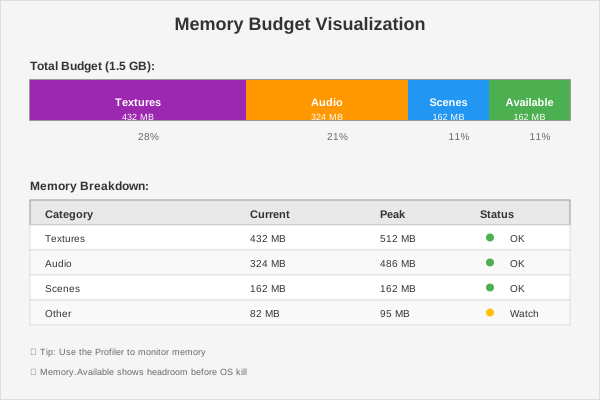
| Member | What it tells you |
|---|---|
Memory.Used | What the engine is holding right now |
Memory.UsedBy(category) | The same, broken down — textures, audio, and the rest |
Memory.Peak | The highest it has been this session. ResetPeak() starts a fresh measurement |
Memory.Available | How much headroom is left |
Memory.Budget | The ceiling, where the platform reports one |
Memory.DriverUsed | What the graphics driver says it's using, as a cross-check |
Memory.IsUnified | Whether RAM and video memory are the same pool (they are on phones and on Apple silicon) |
Memory.PollPressure() | Whether the OS is currently asking for memory back |
On a phone, Available is the number that matters — it's what the OS watches, and running out is a kill, not a slowdown.
if (Memory.PollPressure())
    DropOptionalAssets();
A good habit while building levels: load a scene, unload it, and watch Memory.Used come back to roughly where it started. If it climbs every cycle, something isn't being released — usually an entity that never gets destroyed, or an asset still referenced by a script that outlived its scene.
Development builds only
The allocation counters, the budget warning, and the profiler zones are all compiled out of a Release build. You can leave the calls in your shipping code — they cost nothing there. Memory is the exception: it works in every build.
A checklist before you ship to a phone
- Textures set to
Noneonly where you actually looked and saw a problem. - Anything you spawn during gameplay — bullets, enemies, particles, damage numbers — comes from a pool.
- Every pooled script has an
OnDespawnthat clears its state. - No
$"..."anywhere in anOnUpdate. Profiler.AllocatedBytesThisFramereads 0 while you stand still doing nothing.- Your export log's size breakdown doesn't contain anything surprising.